 BTA F&B
Payment at the counter
For: Cashier
Tap Pay in the cart. The payment panel shows Amount due and the payment methods your venue accepts.
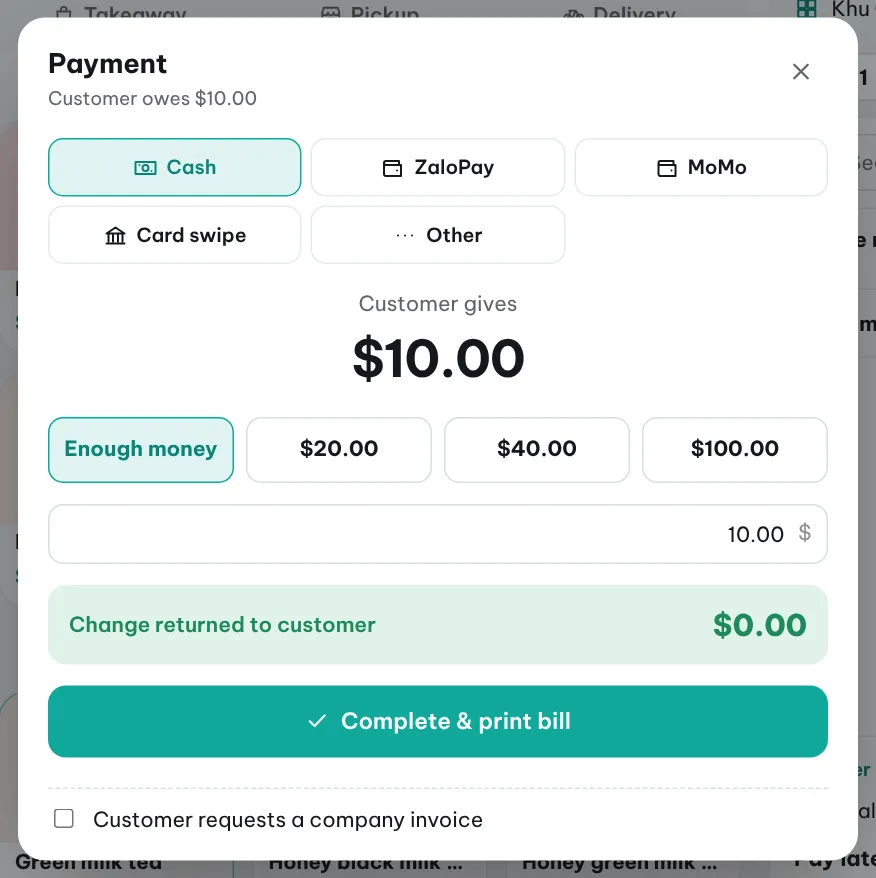
Cash
Enter Cash received or tap a suggested denomination button (Exact amount, $5, $10, $20…). The system calculates the Change due. Tap Complete & print receipt. Cash is automatically added to the shift's cash drawer.
Online payment
Choose PayPal: a payment QR code with the amount and order reference is shown on the POS and on the customer display. The customer scans it with their phone and pays through PayPal or their card. See QR payments and confirming received funds.
Wallets, card, other
PayPal (manual), Apple Pay and Card have a Transaction ID field for reconciliation. Other requires a note on how the customer paid (paper voucher, payment partner…). These methods are not counted in the cash drawer.
Company invoice
Tick Customer needs a company invoice and enter the company details to add them to the order.
Add your venue's payment methods
Go to Settings › Payment, section Counter payment methods, and tap Add method. For each method, choose whether it goes into the cash drawer, whether it has a transaction ID field, or whether a note is required. These methods are used when taking payment, splitting bills, filtering orders and closing shifts.
Still stuck? Message us on WhatsApp. WhatsApp