 BTA F&B
Cashbook
For: Owner
Go to Cashbook. It shows your venue's money in and out for each fund: sales, purchases and debt repayments are recorded automatically, while receipts and payments are entered by you.
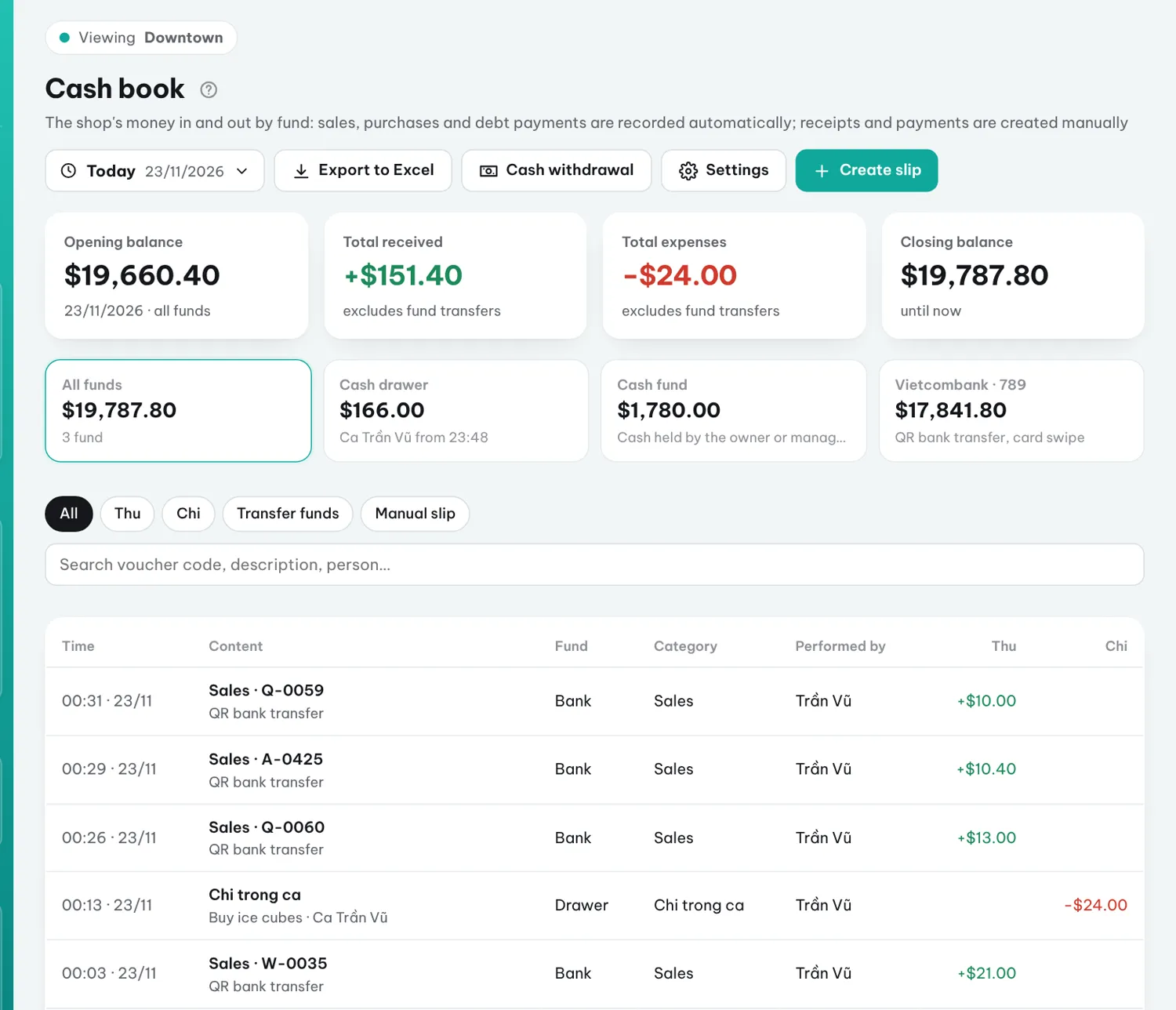
- At the top: Opening balance, Total receipts, Total payments, Closing balance for the selected date range.
- Funds: Cash drawer (per shift), Cash fund (money held by the owner or manager outside the drawer), and Bank accounts (card payments, PayPal and bank transfers). Add your own funds in the Cashbook Settings.
- Filter by Receipts, Payments, Fund transfers, Manual entries. Click Export to Excel to download.
Creating a voucher
Click Create voucher, then choose:
- Receipt: capital contribution, scrap sales, supplier refunds…
- Payment: rent, salaries and bonuses, marketing, other expenses… Select the Category, Pay from fund, the recipient, and attach supporting documents.
- Fund transfer: move money between the drawer, the cash fund and the bank (for example, depositing drawer cash into the bank).
Receipt and payment categories have a Exclude from profit and loss flag for amounts that are not business expenses (capital contributions, owner withdrawals). Vouchers can be printed on 80mm paper.
Still stuck? Message us on WhatsApp. WhatsApp