 BTA F&B
Printing when selling from a phone browser (proxy printer)
For: Owner
A browser on a phone cannot send print jobs directly to a printer. There are 2 ways to handle this:
Option 1 (recommended): install the BTA FnB app
The app prints directly to LAN, Bluetooth and Sunmi printers, with no proxy device needed. The Printers page opened in a phone browser may show the tip Install the BTA FnB app for faster printing, with a download link. See Installing the app.
Option 2: pair a proxy printer
A device at your venue that is always on (a computer running BTA Print, or a phone / POS device with the BTA FnB app open on screen) receives print jobs from the server and sends them to the printer.
Everything is in the Settings › Devices & printers › Printers › Proxy printing for mobile web card:
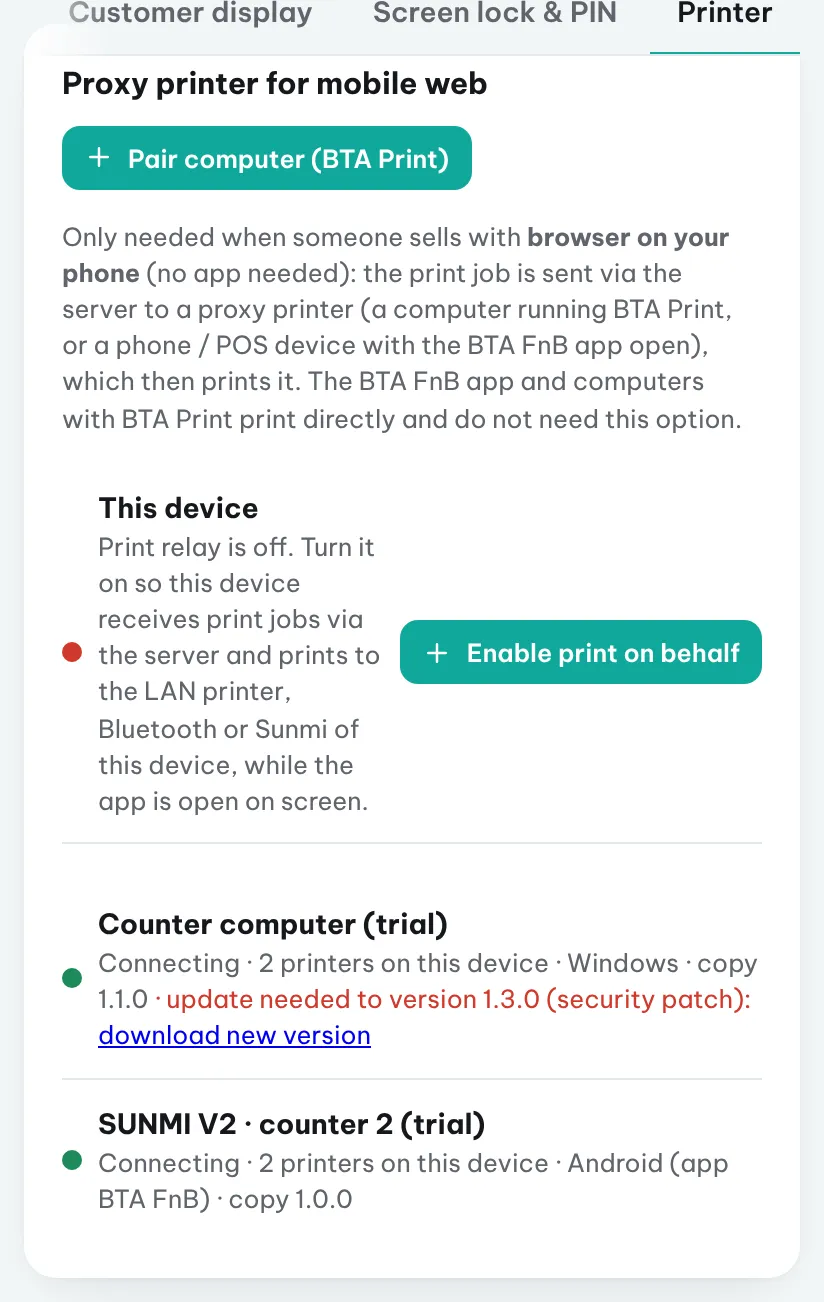
- Computer with BTA Print: tap Pair computer (BTA Print). A 6-digit pairing code appears, valid for 5 minutes (after 5 wrong attempts, pairing is locked for 15 minutes). On the computer, open the BTA Print page, go to Proxy printing for mobile web (optional), and enter the code.
- Phone / POS device with the BTA FnB app: open this card in the app on that very device, find the This device row, and tap Turn on proxy printing. An Android device can print to its own Bluetooth and Sunmi printers; an iPhone / iPad prints to LAN printers and Bluetooth BLE printers (app version 1.3.2 or later).
- The list below shows the branch's proxy printers, with the active ones marked Connected. Tap the trash icon to remove one.
Still stuck? Message us on WhatsApp. WhatsApp